Real Estate Developer CRM Requirements: The End-to-End Playbook
A real estate developer CRM has to run the whole chain from enquiry to title deed: capture and qualify leads, control unit inventory and pricing, move a buyer through block, reservation and SPA, serve the owner after the sale, keep every invoice and receipt reconciled with finance, and pay the right commission to staff and brokers. If any link is missing, teams fall back to spreadsheets and WhatsApp exactly where the money and the legal documents are.
This playbook is built from requirements gathered across many UAE developer CRM implementations. The developers are anonymised as Developer A, B and C. Where they solved the same problem differently, each article compares the approaches so you can choose deliberately.
Who this playbook is for
- Heads of sales and sales operations who own blocks, reservations, approvals and targets.
- CRM and customer-experience heads who own post-sales requests, handover and ownership transfers.
- Finance and credit-control heads who own invoices, receipts, collections and ERP posting.
- Agency owners who want to understand what happens inside the developer after they submit a buyer.
Each section below summarises one part of the system and links to the detailed article in the series. Articles that have not been published yet appear in the series list at the end with their publication date.
The system on one page
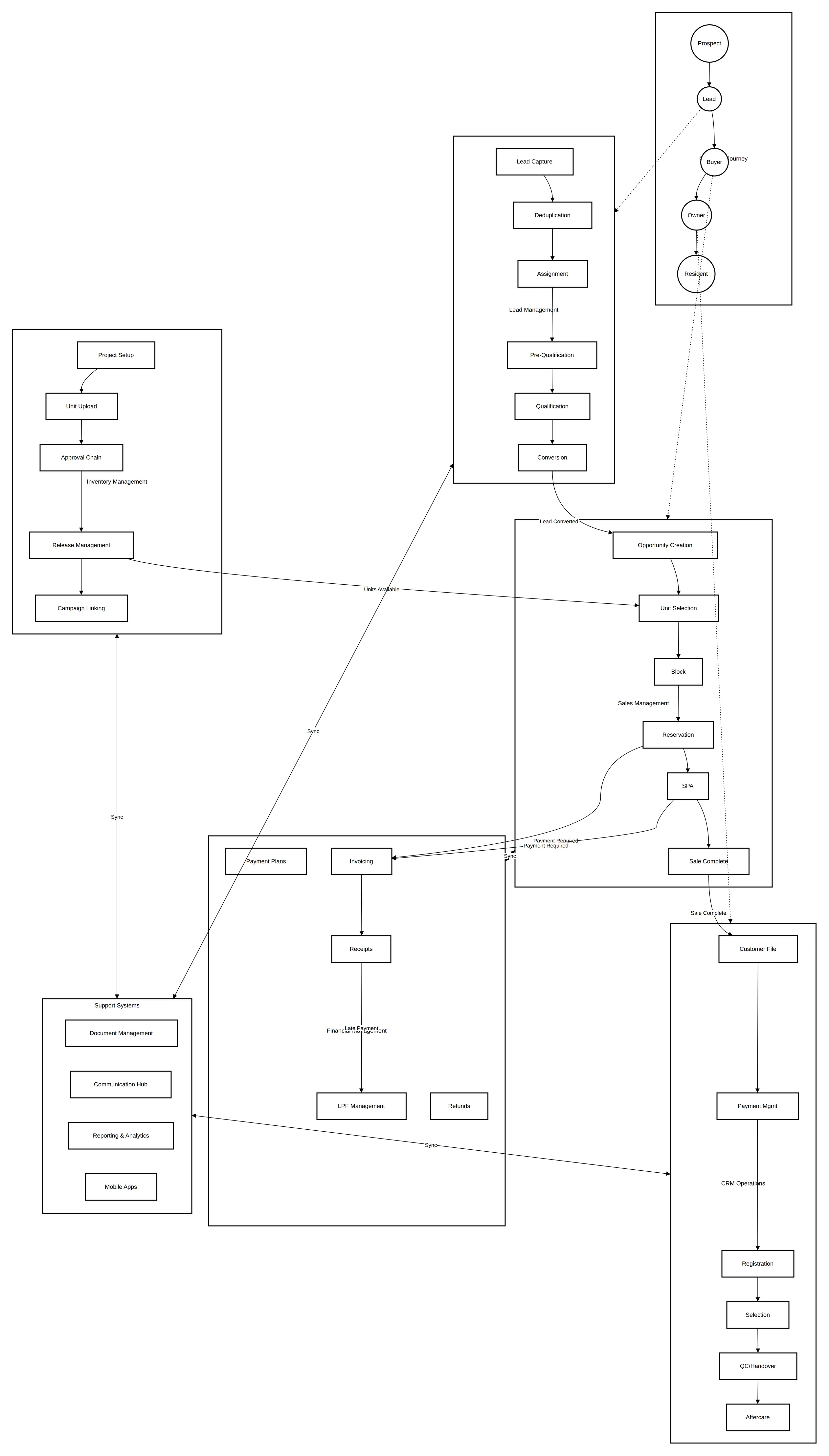
The customer moves through five identities: prospect, lead, buyer, owner and resident. Each identity is served by a different module, and each handoff is a business event the next team relies on:
| Handoff | From | To | What the receiving team needs |
|---|---|---|---|
| Lead converted | Lead management | Sales | A qualified customer, deduplicated, with source and owner |
| Units available | Inventory | Sales | Released units with approved prices and plans |
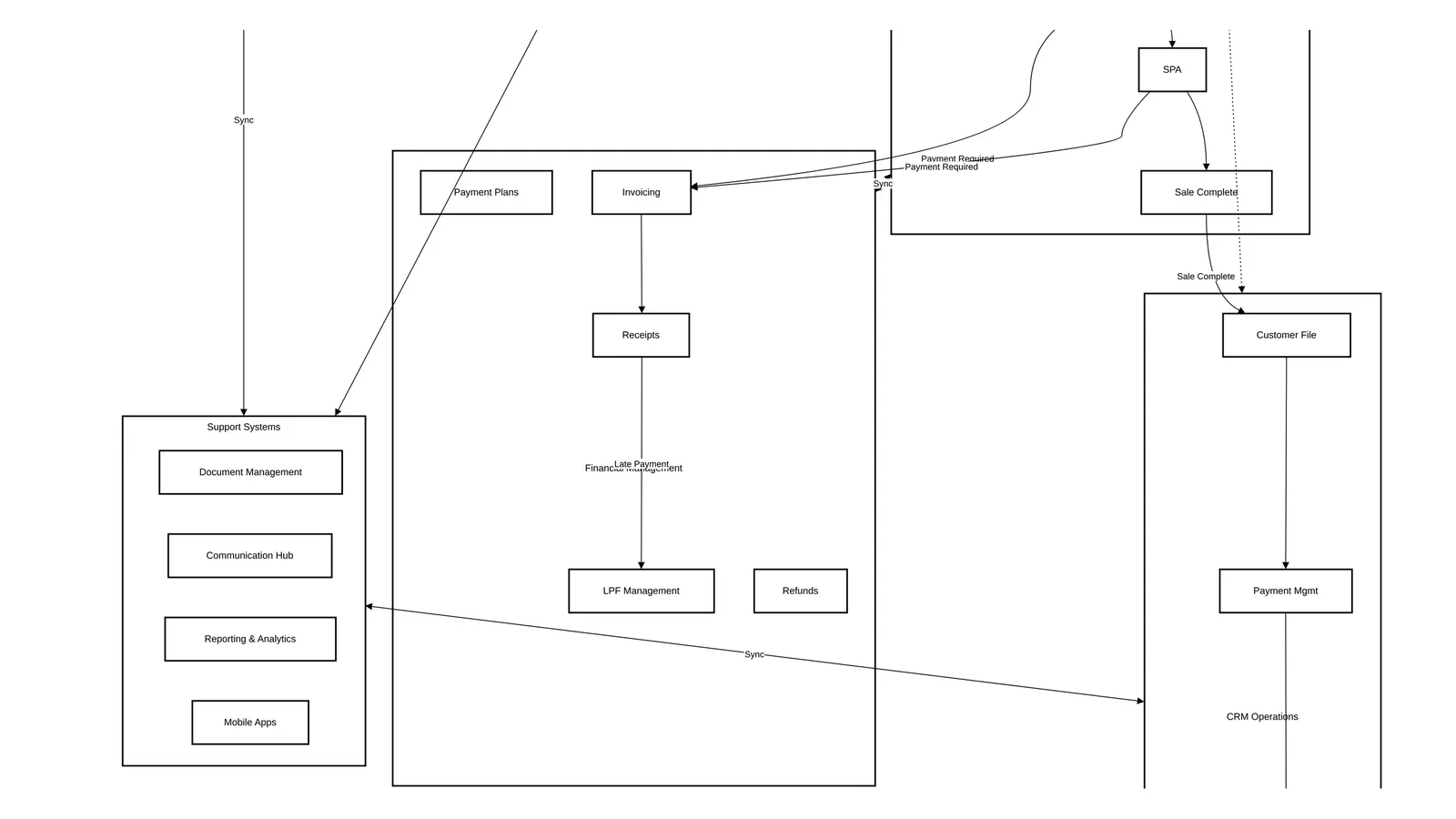
| Payment required | Sales | Finance | Reservation and SPA amounts, receipts to verify |
| Sale complete | Sales | CRM operations | A complete customer file and an effective SPA |
| Late payment | Finance | CRM operations | Overdue amounts, fees and the collection stage |
Most failures in developer CRMs are not missing screens. They are handoffs without a clear owner, a clear status and a clear record of who approved what.
1. Lead management
Leads arrive from walk-ins, sales executives, the website and social campaigns, brokers, events, referrals and inbound calls. A developer CRM needs a source hierarchy (type, category, source, sub-source), a duplicate check on email and phone, round-robin queues with override reasons, a two-step qualification (a pre-qualification call, then a sales executive's assessment) and SLA escalation.
Developers split on who owns the first contact. A centralised lead hub gives consistent qualification; a distributed call centre gives speed at volume.
Read: Developer lead management in the UAE: statuses, round robin and SLAs.
2. Inventory and pricing
Inventory is a hierarchy of project, phase or sector, building and unit, with different required fields for apartments, villas and plots. Units are uploaded in batches, approved by finance and sales operations, and released for sale. From then on the unit status lifecycle is the backbone of the system: available, block pending, blocked, reservation pending, reserved, SPA in progress, sold, and the termination states that return a unit to stock.
Allocation groups decide who can see and book which units, and every price change needs its own approval and history.
Read: Off-plan inventory management: the unit status lifecycle.
3. Payment plans, milestones and campaigns
Payment plans are configured at project, phase or unit level, with instalments due on a date, on a construction milestone plus days, on a document date plus days, or after handover. Construction milestones drive both the instalments and post-sales activities. Discounts, upgrade options, late payment fee rules and campaigns all sit in the same configuration layer.
Read: Configuring off-plan payment plans and construction milestones. For the buyer's view of the same schedules, see off-plan payment plans explained.
4. Blocks, reservations and approvals
The opportunity lifecycle mirrors the unit lifecycle: a block request holds a unit for a customer, a reservation commits it, and finance confirms the money before the unit is reserved. Around that core sit EOIs, sales offers, corporate bookings, reservation amendments, unit swaps and memo approvals for special pricing.
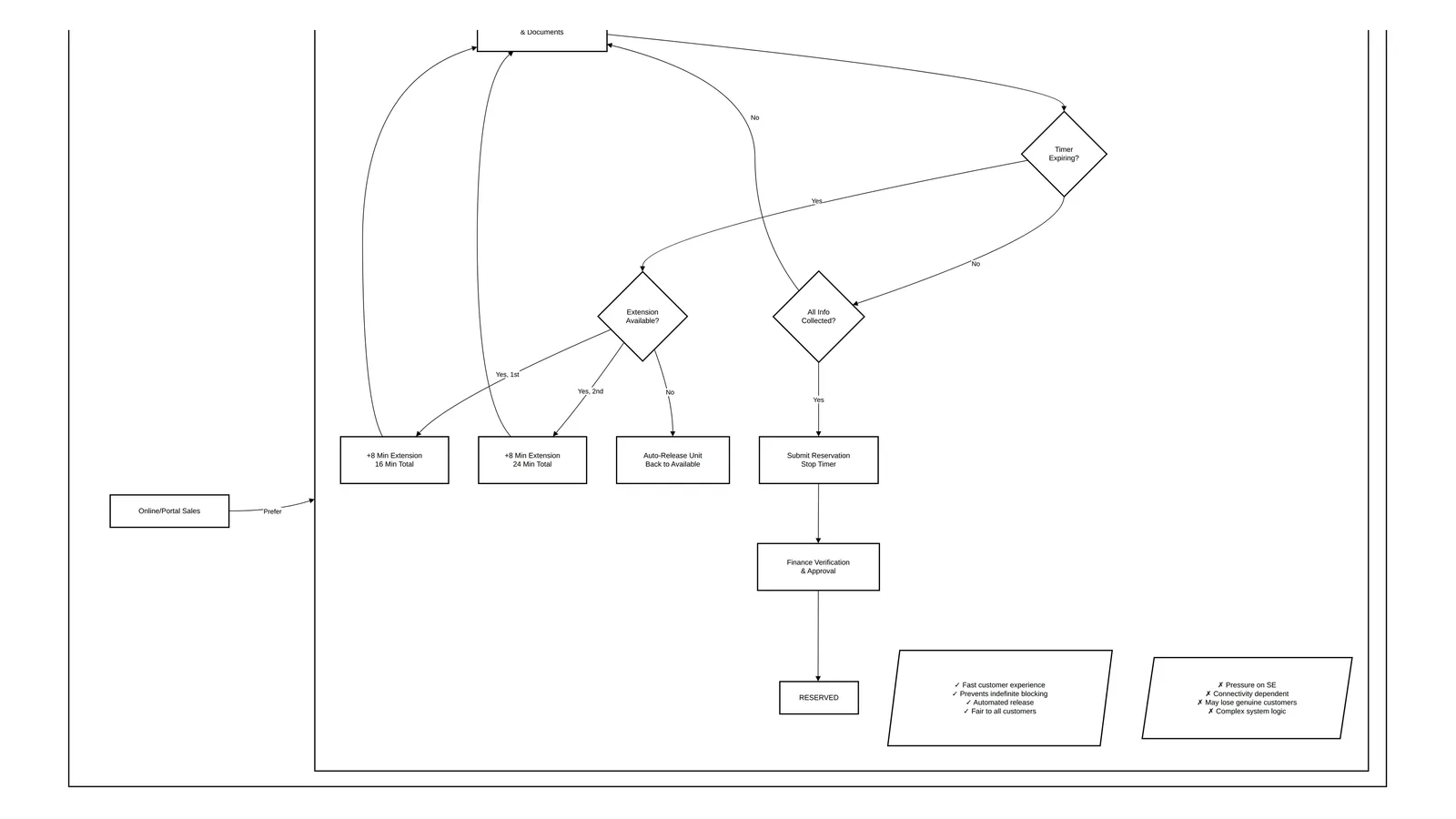
The biggest design choice is approval-based reservation versus a timer-based model that holds a unit for a few minutes while the salesperson completes the booking.
Read: The unit block and reservation process and EOI vs reservation.
5. The SPA
The Sale and Purchase Agreement is triggered automatically when the realised amount matches the down payment, or manually by sales operations. It then moves through verification, printing, customer signature, finance approval, counter-signature and an effective date. That date starts registration in Oqood and, in many setups, the instalment invoices.
Read: The SPA process for off-plan sales in Dubai.
6. Commission
Staff, brokers and managers are paid under different schemes: flat rates, incremental slabs and overall slabs that top up earlier sales when a higher tier is reached. Payouts are split into tranches and released only when eligibility conditions are met. Brokers additionally need vendor registration, scheme setup and tax invoice approval.
Read: Flat vs slab commission structures and the broker commission process for developers. For the fundamentals, start with the commission management guide.
7. Post-sales CRM operations
After the sale, every customer request becomes a service request with its own approval chain: customer file handover, contact changes, payment extensions, payment plan amendments, transfers of ownership, unit registration, selections and upgrades, QC and handover, aftercare during the defects liability period, and cancellations.
The series covers post-sales service requests, transfer of ownership, and handover, snagging and the title deed in separate articles. The glossary defines transfer of ownership, snagging and the title deed.
8. Finance and credit control
Finance owns the invoice types (instalments, upgrades, government fees, late payment fees, admin fees, proforma and advance tax invoices), the receipts (down payments, instalments, online payments, bank transfers, post-dated cheques), the allocation of receipts to invoices, debit and credit memos, and posting to the ERP.
Credit control runs reminders before and after due dates, default notices, termination and release to stock. The series covers collections and termination, and invoices, receipts and ERP integration, in two articles.
9. Data model
Behind the screens sits a data model of roughly forty objects across property, customer, sales, payment plan, financial, commission, tax and document domains. Getting three relationships right prevents most reporting problems: one opportunity to one sales order, one instalment to one invoice, and many receipts allocated across many invoices. The series includes a dedicated data-model article.
10. Reports and dashboards
Each role needs a different view: lead aging and conversion for the lead hub, unit status distribution for sales operations, SPA stages and registration status for operations, target versus actual for management and commission payout summaries for finance. The series closes with reports and dashboards by role.
What to make configurable per project
Developers that run several communities quickly learn that rules differ by project. Build these as settings, not code:
| Setting | Typical options |
|---|---|
| Block validity | A number of days per project |
| Reservation timer | Minutes, plus the number of extensions allowed |
| Down payment threshold | Percentage or fixed amount that triggers the SPA |
| Late payment fee | Daily fixed amount or percentage, cap, grace period and start date |
| Approval SLAs | Hours or days per approval step, with escalation |
| Document checklists | Per process, per buyer type (individual or corporate) |
| Message templates | Email and SMS per event |
| Round-robin queues | Walk-in, general and broker queues |
| Construction milestones | Milestone sets per project or phase, with a default |
| VIP thresholds | Values that route a deal to a different approval path |
How to sequence an implementation
- Agree the status models first. Write down the unit statuses, opportunity stages and lead statuses, and who may move each one. Everything else depends on them.
- Configure one project end to end. Hierarchy, unit fields, prices, plans, milestones and allocation groups for a single project expose most gaps.
- Deliver the booking path. Leads, blocks, reservations and SPA, with finance approvals, before post-sales features.
- Connect finance. Invoices, receipts and ERP posting, with an agreed rule for which system is the master of each record.
- Add post-sales and commission. These depend on clean sales and finance data.
- Build reports last, from the same statuses. Reports built on improvised fields drift from the process.
How Nogbase fits
Nogbase is not a replacement for every module above. Today it covers the part of the chain shared between a developer and its brokers: a broker registry with invites and onboarding, unit inventory with a hold, release, reserve and sold lifecycle and automatic hold expiry, Excel inventory import, project materials, EOI and reservation requests that brokers submit and the developer reviews, and per-project commission terms. It runs alongside an existing CRM or ERP. See the CRM vs ERP guide for how to split responsibilities between them.
Frequently asked questions
What modules does a real estate developer CRM need?
At minimum: lead management, inventory and pricing, sales from opportunity to SPA, post-sales service requests, finance and credit control, and commission. Underneath them sit a data model that ties customers, units and money together, and role-based reports.
Is a developer CRM different from an agency CRM?
Yes. An agency CRM tracks listings, enquiries and deals. A developer CRM also owns the unit lifecycle from upload to release, the payment plan and every instalment, the SPA and registration steps, post-sales requests and the commission owed to staff and brokers.
Should the CRM or the ERP be the master for inventory and money?
Developers do it both ways. Running inventory natively in the CRM gives one source of truth and real-time status; keeping it in an existing ERP or property system reuses established finance processes but adds sync delays. Decide per business fact and write the decision down.
Which settings should be configurable per project or community?
Block validity, reservation timers, down-payment thresholds, late payment fee method and grace period, approval SLAs, document checklists, message templates, round-robin queues, construction milestones and VIP thresholds. Developers change these more often than they expect.
How long does a developer CRM implementation take?
It depends on scope and integrations. A useful rule is to deliver lead, inventory and booking first, then post-sales and finance, then commission, and to configure each project's rules before migrating its data.

Keep Reading
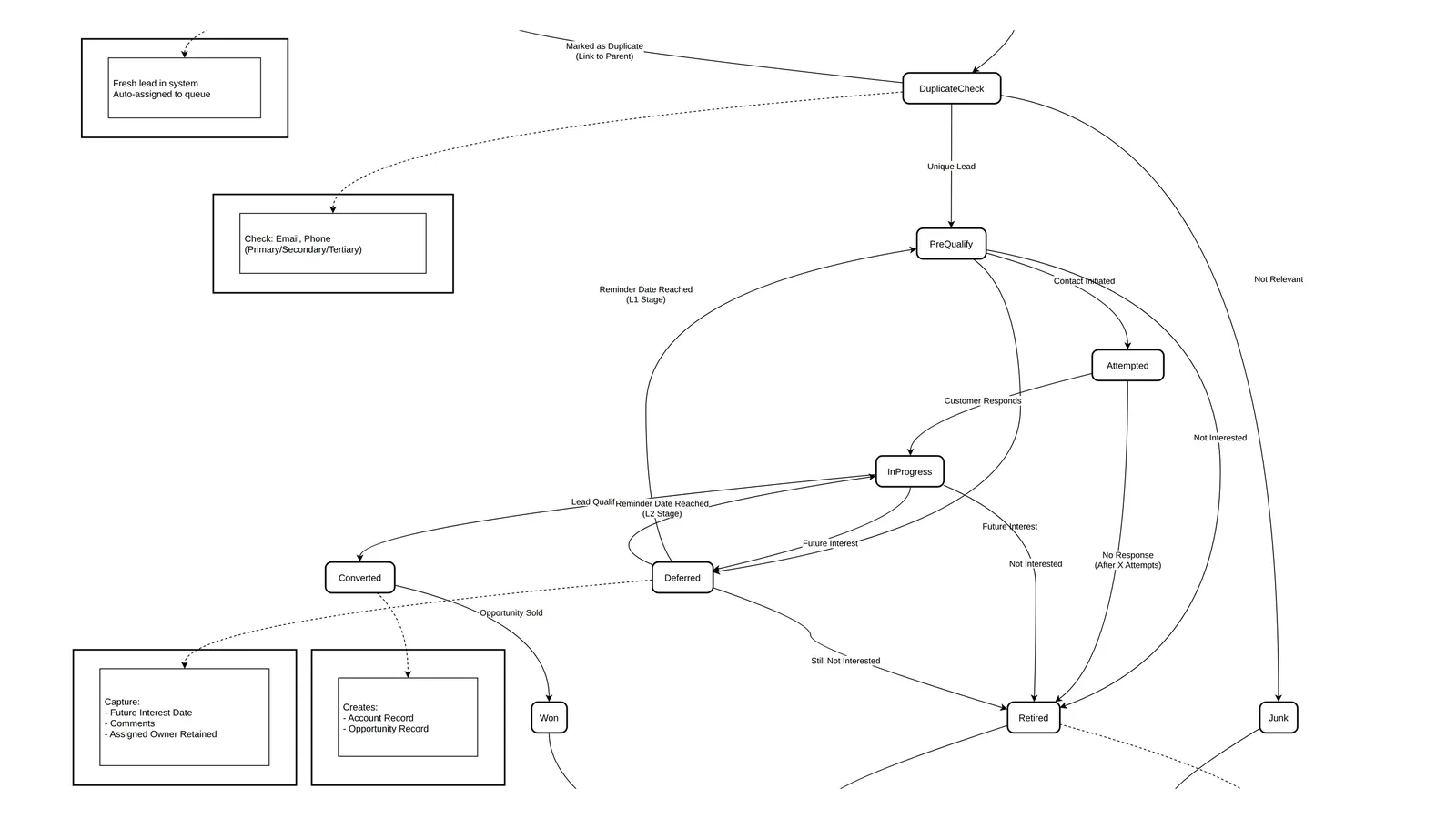
Developer Lead Management in the UAE: Statuses, Round Robin and SLAs
Design lead management for a UAE developer: lead categories and sources, a nine-status lifecycle, deduplication, round-robin queues, L1/L2 qualification and SLAs.