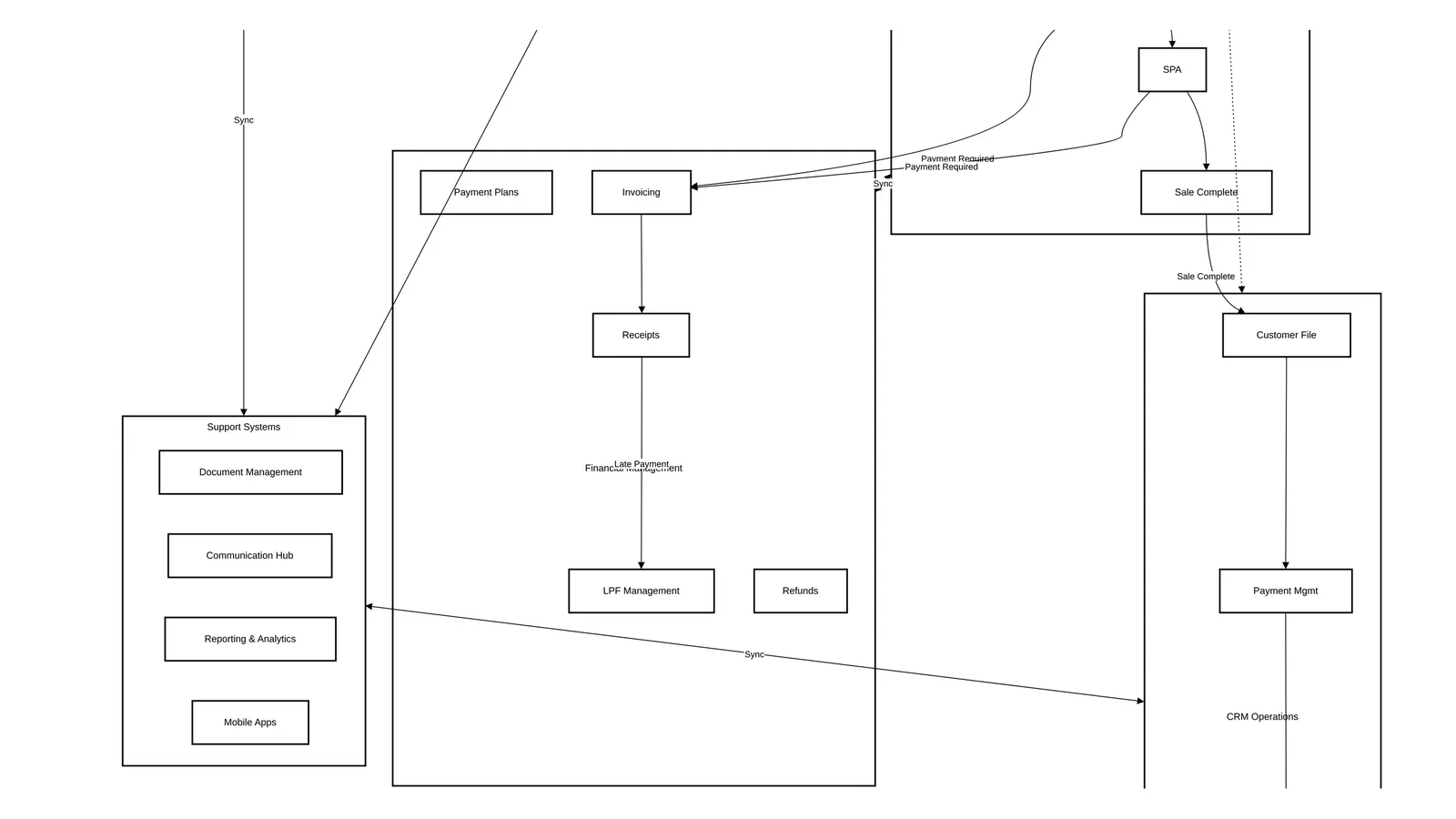
The Unit Block and Reservation Process for Off-Plan Sales
A unit block holds a specific unit for a specific customer, with an approver, a reason and an expiry. A reservation then commits that unit: sales operations checks the documents, finance confirms the money, and only then does the unit become Reserved. Developers either run this through approval queues or through a short timer that holds the unit while the salesperson completes the booking, and the choice changes the speed and the risk of every launch.
This article is part of the developer CRM requirements playbook. It covers the sales stage from a qualified opportunity to a reserved unit. The stage before it is lead management; the stage after it is the SPA.
The opportunity lifecycle

The opportunity stage and the unit status move together. Keep them in lockstep, or reports will show reserved opportunities on available units.
| Opportunity stage | Unit status | What happened |
|---|---|---|
| Qualified | (none yet) | Lead converted to an opportunity |
| In Progress | Available | A unit was linked to the opportunity |
| Block Initiated | Block Pending | Block request submitted |
| Blocked | Blocked | Block approved; unit held |
| Reservation Initiated | Reservation Pending | Reservation submitted |
| Reserved | Reserved | Reservation approved and money confirmed |
| SPA Initiated | SPA In Progress | SPA process started |
| Sold | Sold | SPA approved by finance |
The full set of unit statuses, including the ones that return a unit to stock, is in the unit status lifecycle.
Before the block: accounts, EOIs and offers
Find the customer once
Search accounts by name, email, phone, Emirates ID, account number, a unit they own or passport number. Mask email and phone in results, and log every "update contact details" action. Sales managers should only see accounts where they own at least one opportunity.
Accounts are merged on a 100% match: full name plus email plus phone, or Emirates ID, or nationality plus passport for individuals, and trade registration number for companies. If only the existing account has a completed purchase, merge the new one into it; if neither has, merge the old into the new; if both have, merge by hand.
Expressions of interest
An EOI registers interest before units are released. Sales support sets up EOI ranges per building (unit model or type, price range and fee). The sales manager validates the customer's KYC and employment details, chooses the payment mode, and the customer receives a payment link that expires after 24 hours. Finance verifies the payment, the EOI document is issued, and refunds go through a delegated-authority approval. The difference between an EOI and a reservation is covered in EOI vs reservation.
Sales offers
A salesperson adds one or more units, from one or several projects, picks a payment plan for each, applies one offer per unit (automatic promotions apply by default), attaches collateral such as the marketing plan, and sends the offer. An offer can be generated without an opportunity, addressed to "Dear Customer", for walk-ins who are only comparing.
The unit block
Initiation and approval
The sales executive tags the unit to the opportunity and submits a block request. The unit stays Available until the block is approved. The approver is the sales line manager or sales director.
| Outcome | Effect |
|---|---|
| Approved | Unit becomes Blocked; the requester and MIS admin are notified |
| Rejected | Opportunity goes back to the salesperson to resubmit or cancel |
| Auto-rejected | Another salesperson's block on the same unit was approved first |
| Request for information | The salesperson answers and resubmits, or cancels |
Expiry
- A block is valid for a configurable number of days.
- When it expires, the unit returns to Available and the salesperson and MIS admin are notified.
- The MIS admin, sales operations or a sales manager can unblock at any time.
- If the approval itself is not completed within its SLA, the request is reverted as "block delayed".
Block reasons
Reasons decide who may unblock a unit.
| Type | Examples | Who can unblock |
|---|---|---|
| Standard | Online, VIP sale, partial card payment, partial transfer, sales, bulk sale, management sale, down payment by transfer | Users with unblock rights |
| Restricted | Cancellation under legal restriction, developer restriction | No user unblock; only through the controlling process |
A unit blocked because of a legal dispute must not be released by a sales manager chasing a target. Make that a system rule, not a memo.
The reservation
Prerequisites
- Unit selected from Available or Blocked
- Payment plan selected
- Discount selected, if any
- Upgrade options selected, if any
- Buyer's mandatory details (national ID, passport and so on)
- Mandatory documents collected
- Reservation fee reference (cheque or bank transfer)
- Signed reservation agreement
- Receipt details (cheque number, amount, mode, bank, payee), recorded as Draft
Workflow
- The salesperson submits the reservation to sales operations with the signed agreement and documents. Unit: Reservation Pending. Opportunity: Reservation Initiated.
- Sales operations reviews, corrects or returns it.
- Sales operations approves and submits to finance.
- Finance approves after checking the money has actually arrived.
- Unit and opportunity become Reserved.
- A service request is created for the document controller to upload the counter-signed agreement.
A reservation approved on a cheque that has not cleared is the most common source of later cancellations. Finance approval should mean realised funds.
Corporate bookings
A company purchase needs, in addition: the commercial licence number, a primary contact, shareholders' passports and Emirates IDs, the licence copy, the memorandum of association and an authorised-signatory letter. Use separate document templates for corporate buyers.
Approaches compared: approval-based or timer-based
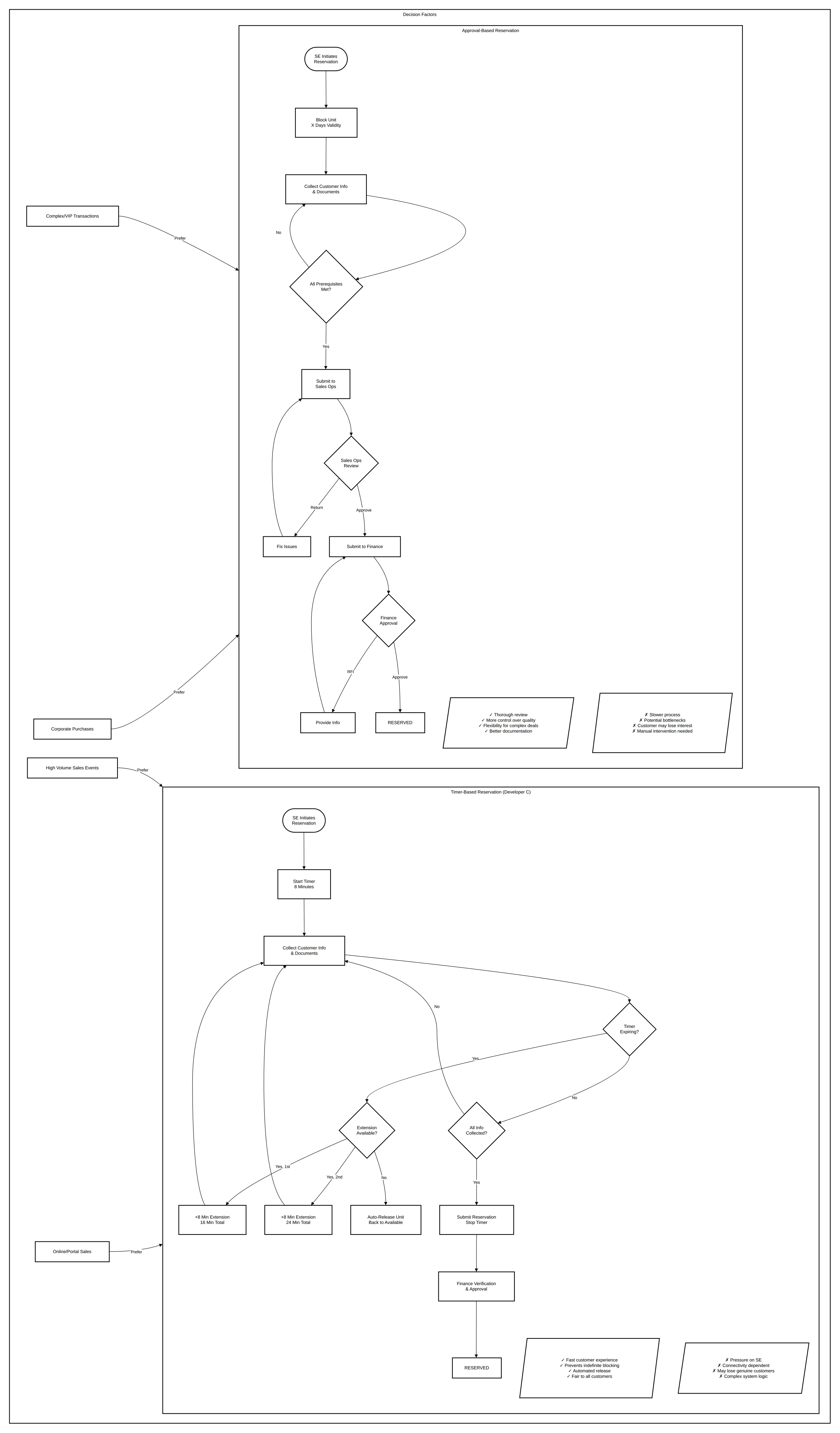
In the timer-based model used by Developer C, starting a reservation starts a timer: eight minutes by default, extendable twice to a total of 24. The unit's status becomes In Progress and it disappears from other users' views. If the salesperson does not complete the booking in time, the unit returns to the same allocation group automatically. If the customer does not proceed within five days (configurable), a notification is sent.
| Timer-based (Developer C) | Approval-based (other developers) | |
|---|---|---|
| Strengths | Fast for the customer, stops slow responders from holding units, automatic release | More control, thorough review, flexible for complex cases |
| Weaknesses | Pressure on the salesperson, lost sales if the timer runs out, needs reliable connectivity | Slower, approval bottlenecks, needs approvers available |
| Best for | High-volume launches, standard products, digitally confident teams | Complex transactions, high-value units, several stakeholders |
Many developers combine them: a timer during launch weekends, approvals for the rest of the year and for VIP units.
After reservation: amendments
| Change | How it works |
|---|---|
| Cancellation | Service request with an approval chain; opportunity becomes Reservation Cancelled and the unit To Be Released; repricing decides whether it returns to Available; invoices and receipts are cancelled with a refund, forfeiture or equity-transfer allocation |
| Customer change | Approved by sales operations and finance; the old receipt is cancelled by a debit memo; a new opportunity is created for the new customer and the transactions are recreated on it |
| Modification | Name corrections, adding or removing a joint buyer (with documents), broker or address corrections, layout choices, and payment plan changes (custom plans need prior approval) |
| Unit swap | Old opportunity closed as Reservation Lost, old unit To Be Released, new unit reserved on a new opportunity, money moved across |
Memo approvals for special terms
A memo records anything outside the standard price list: a special discount, rebate, service-charge waiver, property management or home maintenance years, an admin fee or commission change, a subsidy, or a new payment plan.
- The system computes the net offer value and the net impact percentage.
- The memo goes to the approver group defined by the delegation of authority.
- Approvers see the unit, the net impact, the last six memos and the last six sales on the project.
- On first approval the unit is blocked under the line manager; later approvers are notified.
- On final approval the unit is assigned to the sales manager, and the booking must complete within three days.
- The approved price and plan apply automatically when the memo is selected at booking.
Showing the last six memos is the useful part. Approvers spot a project that is quietly being discounted deal by deal.
Common mistakes
- Blocking on request. The unit stays Available until a block is approved.
- No expiry. Every block needs one, and it must run without anyone remembering.
- Finance approval on promises. Approve the reservation on realised funds.
- Swaps as edits. Changing the unit on an existing reservation hides the history; close and reopen.
- Special terms by email. If it is not a memo, the SPA team cannot see it.
How Nogbase handles holds and reservations
In Nogbase, brokers submit EOIs and reservation requests for specific projects or units from the free Broker App, including joint buyers, and the developer reviews every request in one queue with an activity log. Units follow a hold, release, reserve and sold lifecycle, and holds expire automatically through a background worker. Nogbase does not replace a developer's internal approval matrix, finance verification or memo process; it gives brokers and the developer one record of who asked for which unit and when.
Next in the series: the SPA process.
Frequently asked questions
What is a unit block in off-plan sales?
A block is a temporary, approved hold on a specific unit for a specific customer. It stops other salespeople booking the unit while the buyer decides, and it expires automatically after a set number of days if the reservation does not happen.
Who approves a unit block?
Usually the sales line manager or sales director. The unit stays Available until the block is approved, and if another salesperson's block on the same unit is approved first, the second request is rejected automatically.
What is needed before a reservation can be submitted?
A selected unit, a payment plan, any discount and upgrade choices, the buyer's mandatory details and documents, the reservation fee reference and a signed reservation agreement, with the receipt recorded in draft for finance to verify.
What is a timer-based reservation?
Instead of an approval queue, the system holds the unit for a few minutes while the salesperson completes the booking, for example eight minutes with two extensions. If time runs out, the unit returns to its allocation group automatically.
How is a unit swap handled after reservation?
As a service request with approval. The old opportunity is closed as lost, the old unit goes to To Be Released, the new unit is reserved on a new opportunity, and the money already paid is moved across to it.

Keep Reading
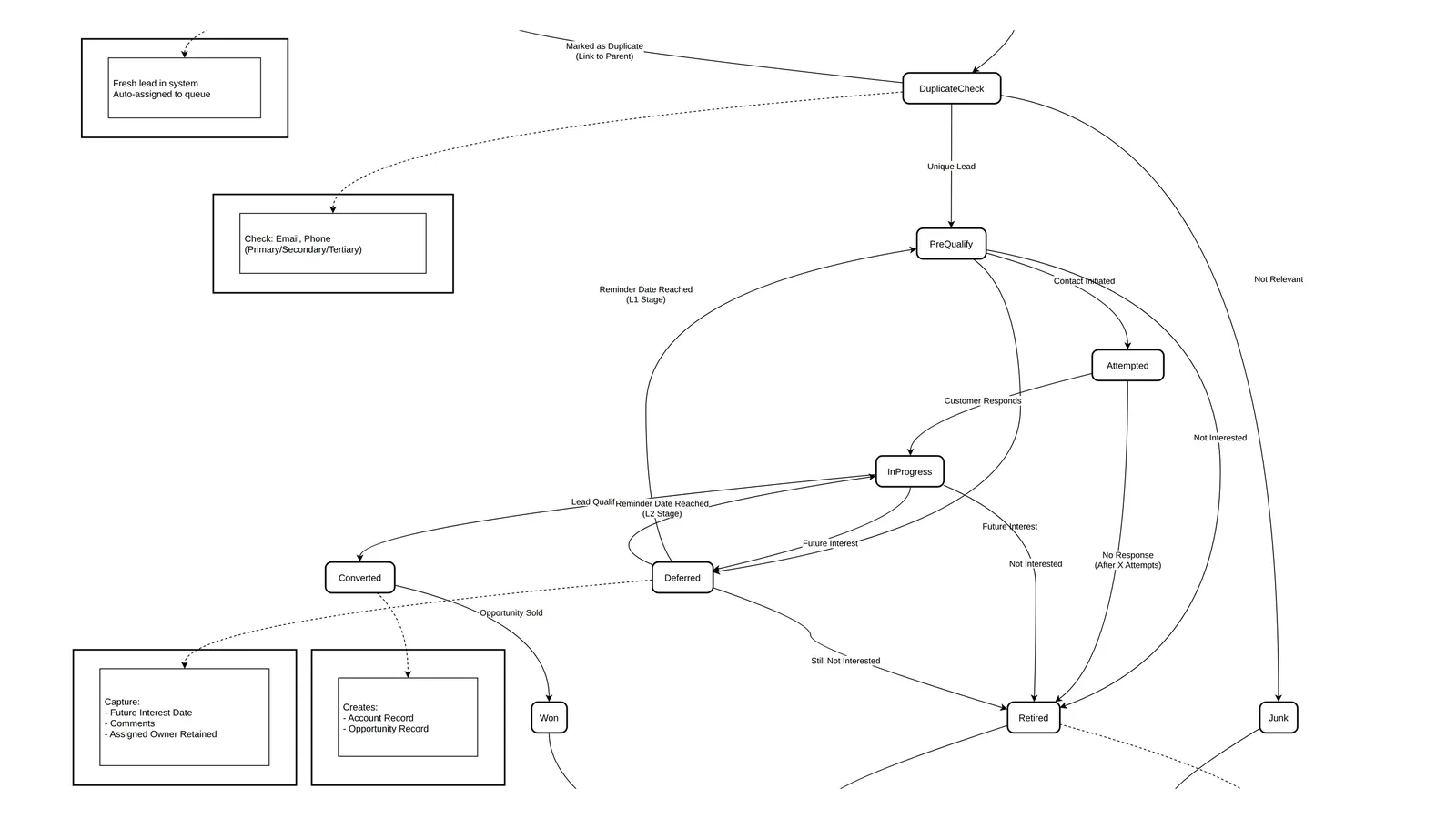
Developer Lead Management in the UAE: Statuses, Round Robin and SLAs
Design lead management for a UAE developer: lead categories and sources, a nine-status lifecycle, deduplication, round-robin queues, L1/L2 qualification and SLAs.