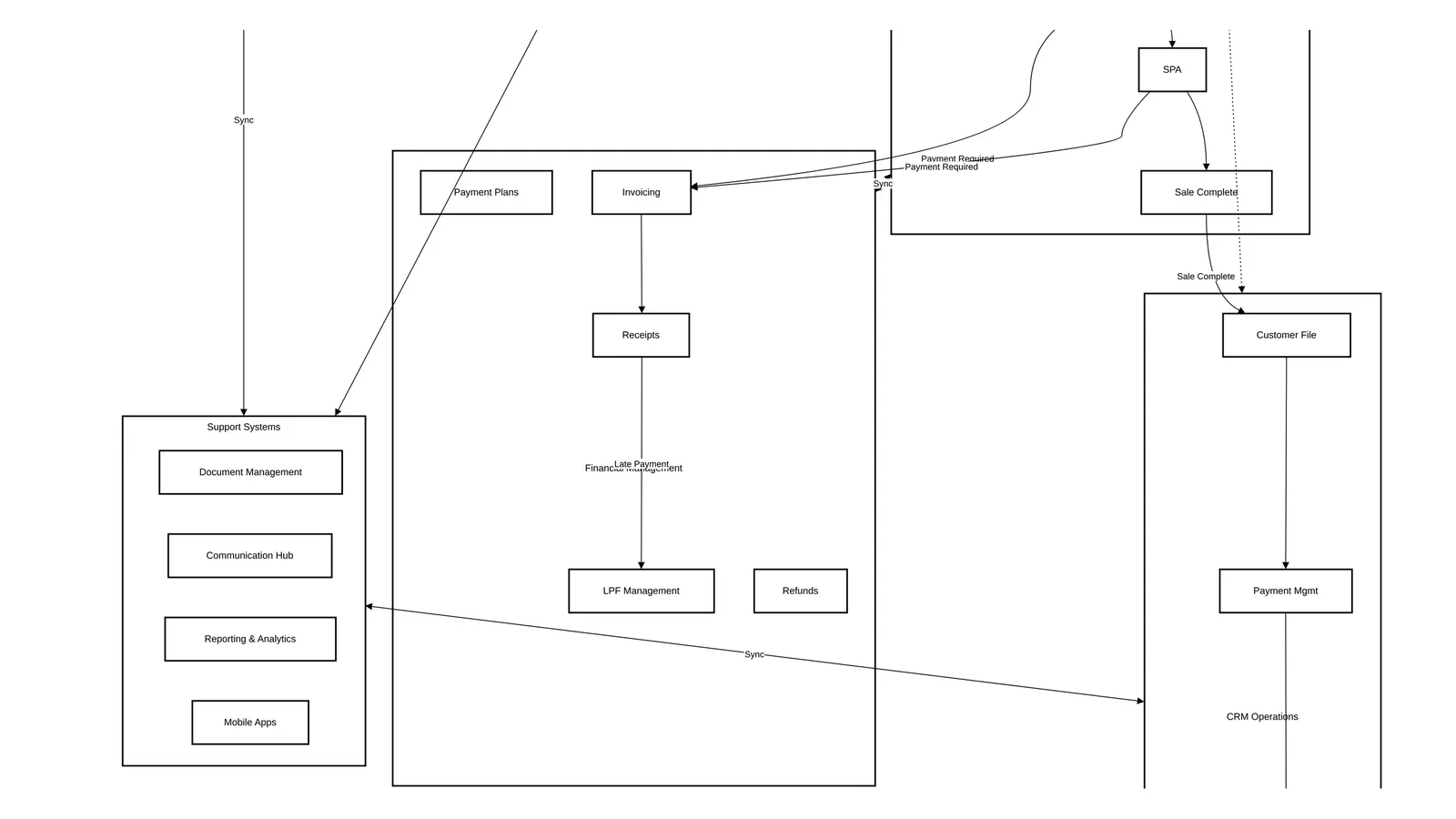
Off-Plan Inventory Management: The Unit Status Lifecycle Explained
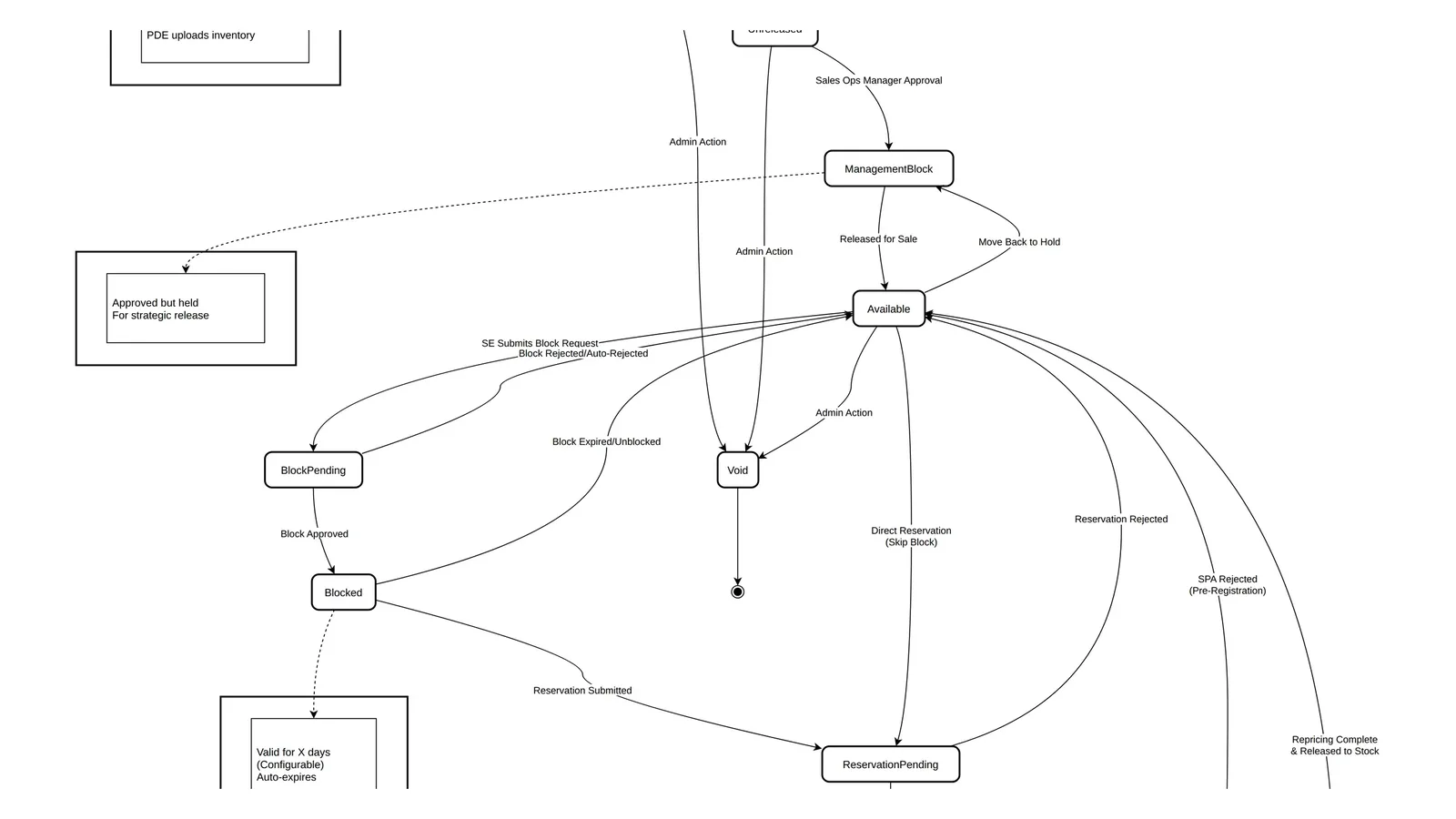
Off-plan inventory management is the discipline of controlling which units exist, which are for sale, at what price, to whom, and in what state. The unit status lifecycle is its backbone: every unit moves from Draft through approval and release to Available, then through block, reservation and SPA to Sold, and only returns to stock through a controlled termination and repricing step.
This article is part of the developer CRM requirements playbook. It follows a unit from upload to release, through its sales statuses, and back to stock.
The inventory hierarchy
| Level | What it represents | Examples of what lives here |
|---|---|---|
| Project or community | The development as marketed | Currency, master payment plans, default milestones |
| Phase or sector | A release or sub-division | Late payment fee rules, discounts, escrow account, completion date |
| Building or section | A physical structure or land parcel | Building name, floors |
| Unit | The sellable property | Unit code, type, area, price, status |
Put each setting at the lowest level that is still shared. A late payment fee rule that differs between two phases cannot live on the project.
Unit types and their required fields
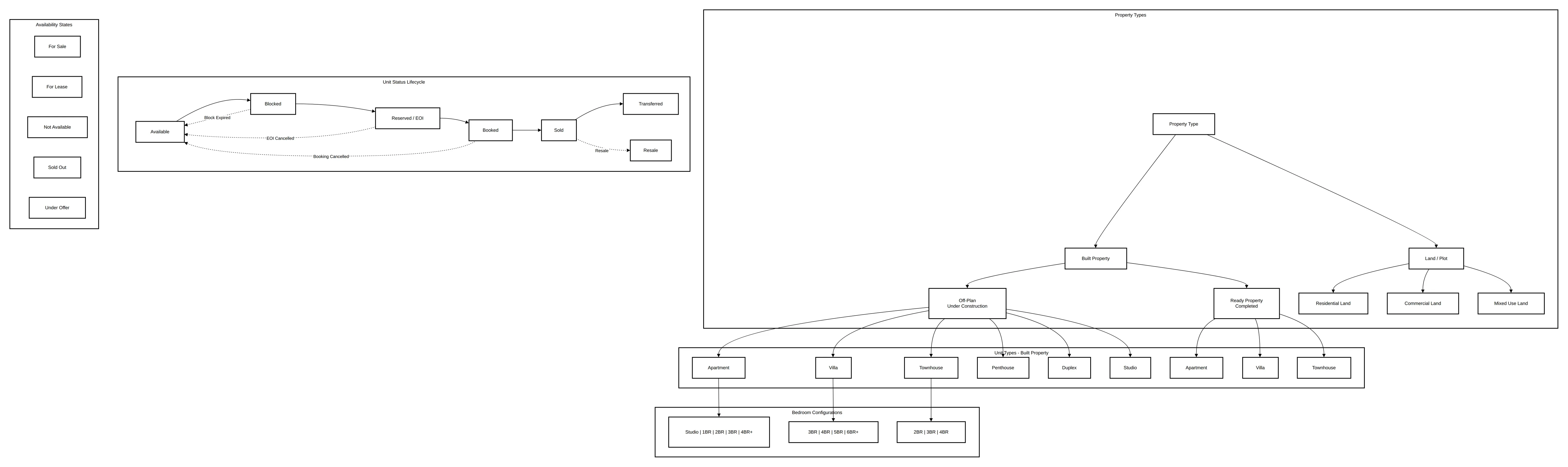
| Type | Required fields |
|---|---|
| Unit (apartment) | Building name, floor number, unit code, unit type, unit model, unit category, property usage |
| Villa or townhouse | As for apartments, plus outdoor areas such as plot and garden |
| Plot or land | Land use, saleable area, total area, plot number |
Make the upload template enforce these per type. A plot uploaded with a floor number and no land use will fail later, at SPA generation.
Upload and approval
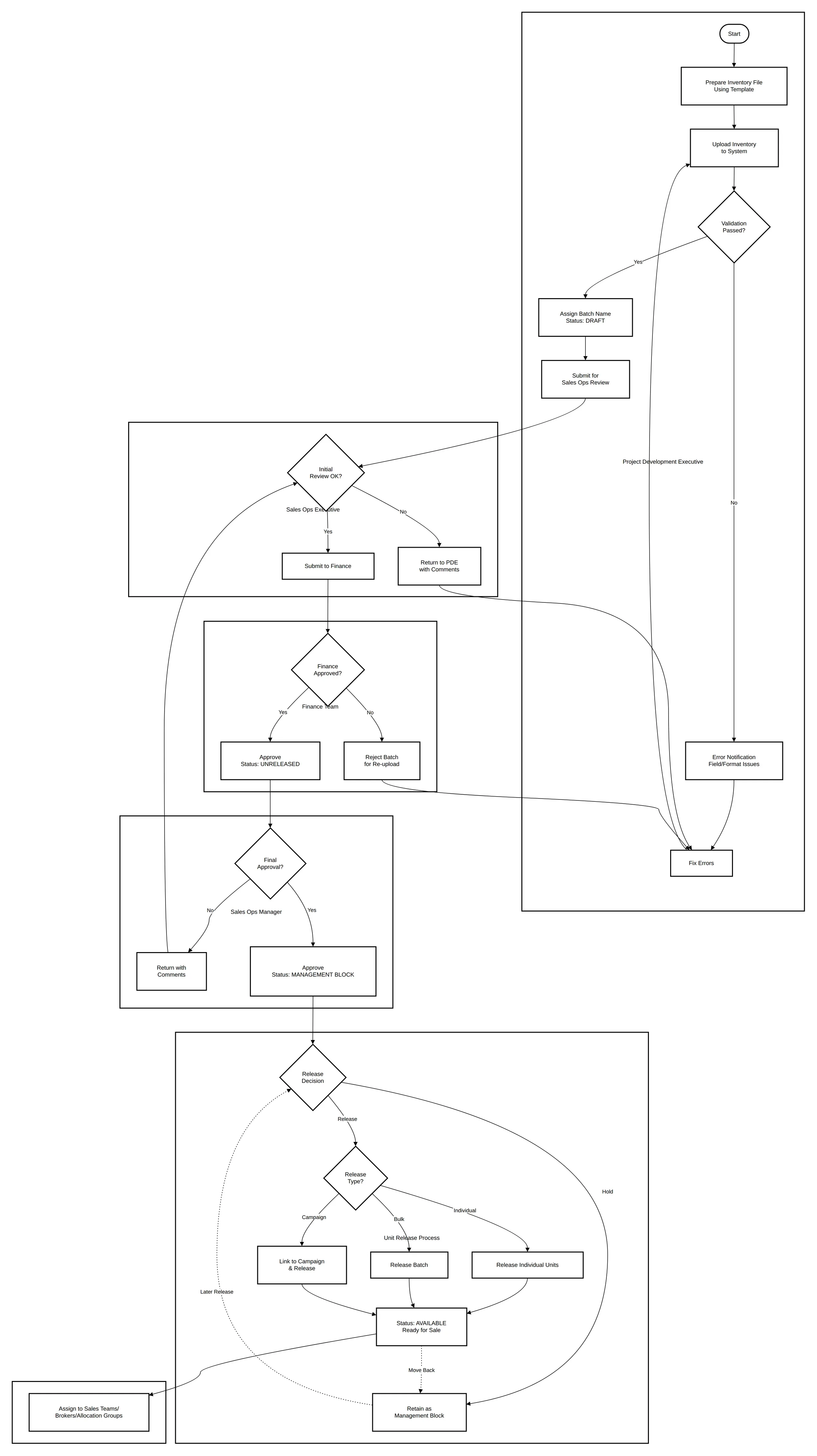
- The project development team uploads an inventory file against a phase or sector, using a predefined template. Some fields are mandatory for every community.
- The upload validates each row and reports errors in detail.
- Each upload gets a batch name, so a wrong batch can be found and deleted as a whole.
- Units start in Draft and are submitted to a sales operations executive for review.
- Finance approves the data and prices. Status becomes Unreleased. Finance can reject the batch for re-upload.
- The sales operations manager approves. Status becomes Management Block.
- Units are released for sale, in a batch or one by one. Status becomes Available.
Finance approving before sales operations is deliberate: prices and areas drive invoices and escrow later, so they are checked first.
The unit status lifecycle
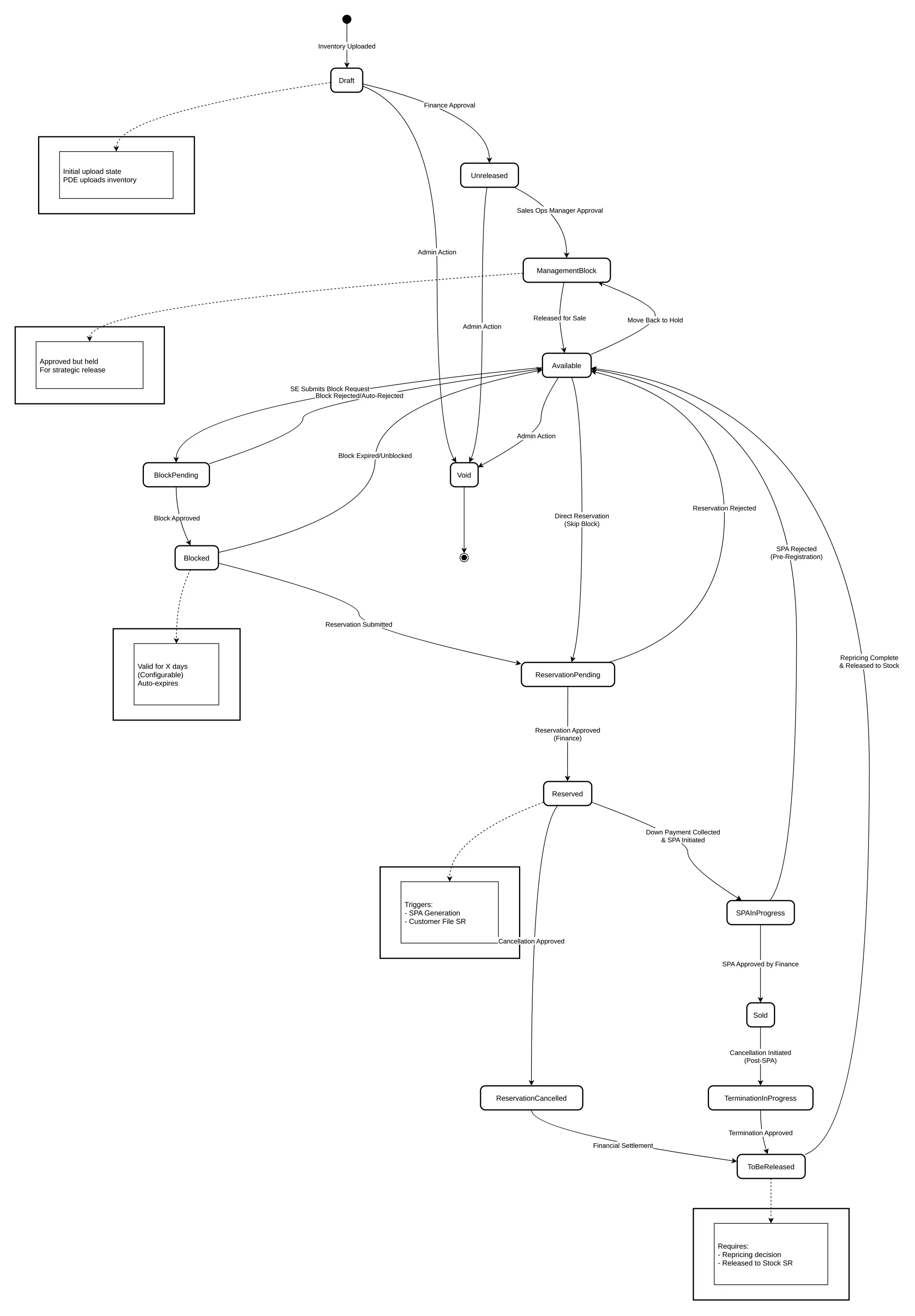
| Status | Meaning | Moved by |
|---|---|---|
| Draft | Uploaded, not reviewed | Project team |
| Unreleased | Finance approved, not yet released | Finance |
| Management Block | Approved but held back on purpose | Sales operations manager |
| Available | Released and visible to the sales team | Sales operations or MIS admin |
| Block Pending | A salesperson asked to hold it for a customer | Sales executive |
| Blocked | Hold approved for a customer or purpose | Sales manager or director |
| Reservation Pending | Reservation submitted, awaiting approvals | Sales executive |
| Reserved | Reservation approved and money confirmed | Finance |
| SPA In Progress | SPA started after reservation or down payment | System or sales operations |
| Sold | SPA approved by finance | Finance |
| Termination in Progress | Cancellation started after SPA | Credit control or CRM |
| To Be Released | Termination or cancellation approved; awaiting repricing | Approval chain |
| Void | Invalid unit, removed from sale | Sales admin |
Three transitions deserve explicit rules:
- Expiry. A blocked unit returns to Available when the block expires. See unit blocks and the block and reservation process.
- Rejection. A rejected reservation or an SPA rejected before registration returns the unit to Available, not to Blocked.
- Return to stock. A sold unit never jumps to Available. It goes through Termination in Progress and To Be Released, and an administrator reprices it before release to stock.
Void is only allowed from Draft, Unreleased or Available. Voiding a reserved unit would orphan the buyer's money.
Allocation groups
Allocation groups decide who sees and books what.
- Typical groups: a regional team, a VIP group, general inventory, broker inventory and the customer portal.
- The director of sales adds and removes users.
- Units are assigned to a group or to named users.
- Only members of the assigned group can view and book those units.
The broker group is where most disputes start. If a unit is in the broker group, every broker in it sees the same availability at the same time; if it is not, no broker should be able to request it.
Updating inventory and prices
- Updates can be individual or in bulk: download, edit, re-upload.
- Units in Unreleased or Management Block can be updated by the MIS admin.
- Every change needs finance and sales operations manager approval and keeps a full history.
- The selling price carries a comment and a revision number, and field history is tracked.
- Price changes by anyone other than a system administrator go through an approval workflow.
- An approved price applies to all future transactions, never to existing reservations.
- Currency is inherited from the project.
What administrators can do
The MIS admin or sales operations role typically can:
- release units to Available, keep them in Management Block, or move Available units back to Management Block;
- link and release units to predefined campaigns;
- assign inventory to sales teams and brokers;
- set sales and turnover targets by project, phase or sector;
- export the full inventory to Excel.
Keep these rights narrow. A user who can both change a price and approve a reservation can sell a unit at a price nobody approved.
Approaches compared: where inventory lives
| Inventory native in the CRM | Inventory mastered in an existing property or ERP system | |
|---|---|---|
| Strengths | One source of truth, real-time status, full control, unified reporting | Reuses an established system, strong finance integration, existing processes |
| Weaknesses | Needs data migration, master data may be duplicated, complex ERP sync | Integration complexity, sync delays, split ownership, dual maintenance |
| Best for | New implementations and a single-platform strategy | Developers with a large existing investment and strict finance controls, or a phased migration |
Whichever you choose, the unit status must have one master. Two systems that can both set a unit to Reserved will eventually sell it twice.
Common mistakes
- Statuses as free text. Use a fixed list with allowed transitions.
- Releasing before finance approval. Prices published before approval end up on sales offers.
- No batch names. A wrong upload then has to be found unit by unit.
- Repricing in place. Keep the revision history; finance will need it.
- Allocation by spreadsheet. If the system does not enforce groups, a broker will book a VIP unit.
How Nogbase handles inventory
Nogbase's Developer App imports inventory from Excel through its Data Wizard and per-project import sessions. Units follow a hold, release, reserve and sold lifecycle, and a background worker releases holds when they expire. Developers can share inventory with specific brokers or all active brokers, and brokers see availability in the free Broker App. Nogbase does not replace the finance approval chain, repricing workflow or ERP master data described above.
Next in the series: configuring payment plans and construction milestones.
Frequently asked questions
What unit statuses does an off-plan developer need?
A full lifecycle usually has Draft, Unreleased, Management Block, Available, Block Pending, Blocked, Reservation Pending, Reserved, SPA In Progress, Sold, Termination in Progress, To Be Released and Void. Reservation Cancelled is often tracked as an opportunity outcome that sends the unit to To Be Released.
What is a management block?
A unit that finance and sales operations have approved but deliberately held back from sale, for example to release a floor later at a higher price. Only administrators can move it to Available or back.
Who should approve an inventory upload?
Typically the project team uploads, a sales operations executive reviews, finance approves the data and prices, and the sales operations manager approves before release. Each step can reject the batch back for correction.
What are allocation groups in real estate inventory?
Allocation groups decide which users can see and book which units, such as a VIP group, a broker inventory group or a regional team. Units are assigned to groups or to individual users, and only members can view and book them.
Can sold units go back on sale?
Yes, through termination or cancellation. The unit moves to To Be Released, a repricing decision is made, and only then is it released to stock as Available. It should never jump straight from Sold to Available.

Keep Reading
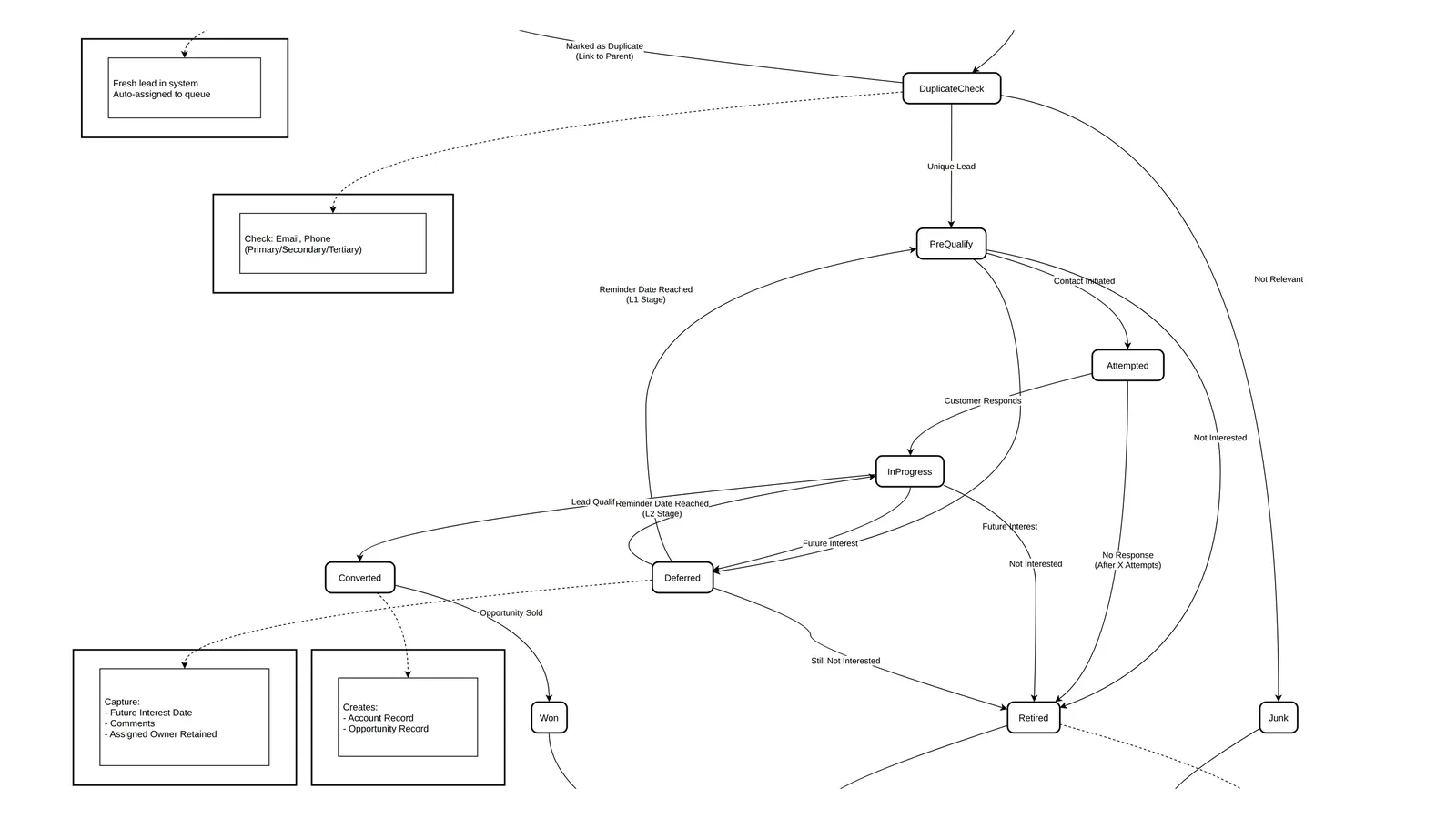
Developer Lead Management in the UAE: Statuses, Round Robin and SLAs
Design lead management for a UAE developer: lead categories and sources, a nine-status lifecycle, deduplication, round-robin queues, L1/L2 qualification and SLAs.